
17 Ways to Protect Your Bank Account From Scams and Fraud
17 Ways to Protect Your Bank Account From Scams and Fraud
Bank scams can begin with a convincing text, fake fraud call, phishing email, stolen password or urgent request to transfer money. Fortunately, simple security habits can make many attacks harder to succeed. Here are 17 practical ways to protect your bank account from scams and fraud.
To protect your bank account from scams, use a unique password, enable multifactor authentication, turn on transaction alerts, secure your phone and email, avoid unexpected banking links, never share verification codes, verify unusual calls independently and never transfer money because someone says doing so will “protect” your account. In addition, review transactions regularly and contact your bank promptly if you notice unauthorized activity.
Why Bank Account Fraud Protection Matters
Your bank account may hold money needed for rent, food, emergencies, bills, savings and other essential expenses.
As a result, criminals do not necessarily need to steal thousands of dollars to cause serious disruption. Even temporary loss of access to your account can create financial stress.
Modern scams also look increasingly convincing. Fraudsters may know your name, phone number, address or even details about companies you use.
However, having personal information does not prove that a caller or message sender is legitimate.
Scammers can obtain information through data breaches, social media, public records, phishing and other sources. They then use those details to make fraudulent stories appear believable.
17 Bank Account Protection Tips at a Glance
| # | Protection Step | Main Risk It Helps Reduce |
|---|---|---|
| 1 | Use a unique bank password | Credential reuse |
| 2 | Enable multifactor authentication | Account takeover |
| 3 | Never share verification codes | Authentication theft |
| 4 | Turn on transaction alerts | Fraud going unnoticed |
| 5 | Review your account regularly | Delayed fraud detection |
| 6 | Do not trust unexpected bank calls | Bank impersonation scams |
| 7 | Avoid banking links in unexpected messages | Phishing |
| 8 | Never move money to “protect” it | Imposter transfer scams |
| 9 | Secure your phone | Physical device theft |
| 10 | Protect your email account | Password-reset attacks |
| 11 | Protect your mobile number | SIM-swap attacks |
| 12 | Keep devices and apps updated | Known software vulnerabilities |
| 13 | Verify payment instructions | Invoice and transfer fraud |
| 14 | Be careful with public Wi-Fi | Unsafe connections |
| 15 | Protect debit cards and PINs | Card theft and unauthorized use |
| 16 | Limit information shared publicly | Social-engineering attacks |
| 17 | Act quickly after suspicious activity | Larger or repeated losses |
17 Ways to Protect Your Bank Account From Scams and Fraud
Use a Strong, Unique Password for Your Bank Account
Never reuse your banking password on social media, shopping websites, streaming services or other accounts.
Password reuse creates a chain reaction. If another website suffers a breach, criminals may try stolen username-and-password combinations on banking websites.
Therefore, your banking password should be unique and difficult to guess.
A reputable password manager can help generate and store long, unique passwords without requiring you to memorize every credential.
Enable Multifactor Authentication
Multifactor authentication adds another layer between your password and your bank account.
Depending on the institution, the second step may involve an authenticator app, security key, trusted-device confirmation, biometric authentication or one-time code.
Consequently, a criminal who obtains your password may still face another barrier before accessing your account.
Use the strongest authentication option your financial institution supports and that you can use reliably.
Never Share a Bank Verification Code
A verification code may be the final piece a scammer needs to enter your account.
For example, a criminal may already have your username and password. They then attempt to log in, causing your bank to send a security code to your phone.
Next, the scammer calls pretending to be from the bank and asks you to read the code aloud.
Never give an unexpected caller or message sender your one-time authentication code. If you are concerned about your account, end the conversation and contact your bank independently through an official channel.

Turn On Bank Transaction Alerts
Fraud is easier to address when you discover it quickly.
Many banking apps allow alerts for purchases, ATM withdrawals, account transfers, password changes, low balances and other activity.
Therefore, configure notifications for transactions you would want to know about immediately.
If an alert appears for something you did not do, investigate promptly.
Review Your Bank Account Regularly
Alerts are useful, but they should not replace manual account reviews.
Open your bank account periodically and scan recent transactions.
Look for unfamiliar merchants, unexpected transfers, duplicate charges and ATM withdrawals you do not recognize.
In addition, pay attention to small transactions. A suspicious charge does not become harmless simply because the amount is low.
Consider a short weekly account check as part of your normal money-management routine.
Do Not Automatically Trust Someone Calling From “Your Bank”
Caller ID can be misleading.
A scammer may make a call appear to come from a familiar bank or company. Furthermore, the caller may already know personal information about you.
That does not prove the call is genuine.
If someone unexpectedly says your account has been hacked, end the call and contact your bank through the official app, the number printed on your card or another trusted source.
Do not rely on a phone number supplied by the unexpected caller.
Avoid Clicking Banking Links in Unexpected Texts or Emails
Phishing messages commonly claim that your account has been locked, compromised or charged unexpectedly.
The goal is often to make you click before you have time to think.
Instead, launch your bank's official app yourself or type the known website address directly into your browser.
Never Transfer Money to “Protect” Your Account
This is one of the most important bank-scam warning signs.
A caller may say hackers are stealing your money and instruct you to transfer your savings into a temporary “secure account.”
Alternatively, the scammer may tell you to move money to cryptocurrency, a payment app or another bank.
If someone unexpectedly tells you that moving money is necessary to protect your bank balance, end the conversation and contact your real financial institution independently.

Secure the Phone Connected to Your Bank Account
Your smartphone may provide access to your banking app, email, text messages and authentication codes.
Therefore, protect the device itself.
Use a strong PIN, password or supported biometric lock. In addition, configure the device to lock automatically after a short period of inactivity.
Protect Your Email Account as Carefully as Your Bank Account
Email is frequently connected to password resets and account-recovery processes.
As a result, someone who gains control of your email may be able to interfere with other accounts.
Use a unique email password and enable multifactor authentication where available.
Protect Your Phone Number Against SIM-Swap Fraud
In a SIM-swap attack, a criminal attempts to move your mobile number to another SIM or device.
If successful, the criminal may receive calls or text messages intended for you.
Ask your mobile provider whether it offers an account PIN, number-transfer lock or other protection against unauthorized transfers.
If your phone unexpectedly loses cellular service while people around you still have normal service, investigate quickly.
Keep Your Banking App, Browser and Phone Updated
Software updates do more than add new features.
They can also patch known security vulnerabilities.
Therefore, keep your phone operating system, banking app, web browser and other important applications current.
Verify Bank Transfer Instructions Before Sending Money
Payment-instruction scams can be extremely convincing.
For example, a criminal may gain access to an email conversation and send “updated banking details” just before an invoice is due.
Before sending a significant transfer, independently verify unusual or changed account details.
The larger the transfer, the more valuable a short verification call can become.
Be Careful When Banking on Public Wi-Fi
Public Wi-Fi is convenient in airports, hotels, restaurants and coffee shops.
However, fake networks can imitate legitimate Wi-Fi names.
Modern banking apps commonly use encryption. Nevertheless, using cellular data or another trusted connection can reduce unnecessary risk during sensitive financial activity.
Protect Your Debit Card and PIN
Keep your physical card secure and do not reveal your PIN unnecessarily.
When using an ATM, examine the machine before inserting your card.
Furthermore, consider shielding the keypad while entering your PIN.
Limit the Personal Information You Share Publicly
Scammers use information to make impersonation more believable.
For example, public social-media posts can reveal birthdays, family relationships, travel plans, employers and other personal details.
Therefore, review privacy settings and think carefully before posting sensitive information publicly.
Act Quickly When Something Looks Wrong
Do not wait several days hoping an unfamiliar transaction will explain itself.
If you believe someone accessed your account or made an unauthorized transaction, contact your financial institution promptly through an official channel.
Next, follow the bank's fraud-reporting instructions.
Keep your bank's official fraud-reporting contact information somewhere accessible before an emergency occurs.
Real-Life Example: The Fake Bank Fraud Call
Rachel Gets an Urgent Call
Rachel receives a phone call from someone claiming to work in her bank's fraud department.
The caller knows her full name and says someone is currently attempting to empty her savings account.
Next, he tells Rachel that she must move the money into a temporary “secure account.”
The situation sounds frightening. However, Rachel remembers that legitimate fraud protection should not require her to transfer savings to an unfamiliar account.
She ends the call and opens her bank's official mobile app.
Her bank confirms that the original caller was a scammer.
Key lesson: Knowledge about you does not prove a caller works for your bank.
Case Study: The Verification-Code Attack
James Nearly Gives Away Account Access
James receives a text claiming that someone has attempted to log into his bank account.
Minutes later, a caller says she works for the bank and is investigating the attempt.
While they are speaking, a legitimate verification code arrives on James's phone.
The caller asks him to read the code back.
Instead, James ends the conversation and contacts the bank himself.
The bank explains that someone was trying to log into his account.
Key lesson: A legitimate-looking verification code does not make the person asking for it legitimate.

Common Bank Scams and Their Warning Signs
| Scam Type | What the Scammer May Say | Safer Response |
|---|---|---|
| Fake fraud department | “Your account is being hacked right now.” | Hang up and call your bank independently |
| Verification-code scam | “Read me the security code we just sent.” | Never share the code |
| Safe-account scam | “Transfer your money so we can protect it.” | Do not move the money |
| Phishing text | “Click here or your account will be frozen.” | Open your official banking app directly |
| Fake invoice | “Our bank details have changed.” | Verify independently with the business |
| Remote-access scam | “Install this app so I can fix your account.” | Do not give unexpected callers remote access |
| Payment-demand scam | “You can only pay by wire, transfer, crypto or gift card.” | Stop and verify the request |
| SIM swap | Your phone suddenly loses service | Contact your mobile carrier promptly |
What to Do If You Think Your Bank Account Was Compromised
Immediately
- Contact your bank through an official channel.
- Report unfamiliar transactions.
- Lock affected cards if available.
- Change compromised banking passwords.
- Secure your email account.
Then Review
- Recent transactions
- Saved recipients
- Account contact details
- Authentication methods
- Mobile carrier security
- Other accounts using the same password
Unauthorized Transaction vs Scam-Induced Payment
| Situation | Example | Why the Difference Matters |
|---|---|---|
| Unauthorized transaction | A criminal uses your debit card without permission | Specific consumer protections and reporting rules may apply |
| Account takeover | A criminal logs in and transfers money without your approval | Report promptly and follow bank fraud procedures |
| Authorized scam payment | A scammer convinces you to send the money yourself | Recovery may be much more difficult |
| Mistaken transfer | You enter the wrong recipient details | Contact the bank immediately; reversal is not guaranteed |
How Scammers Create False Urgency
Urgency is one of the strongest psychological tools used in financial fraud.
A scammer may claim that your bank account will be emptied within minutes.
Alternatively, they may say your card is being used overseas, your identity has been stolen or law enforcement is investigating your account.
The goal is to keep you reacting rather than verifying.
Common Pressure Phrases
- “You must act immediately.”
- “Do not hang up.”
- “Do not tell anyone about this investigation.”
- “Your money is not safe where it is.”
- “Transfer everything before the hackers get it.”
- “Give me the verification code now.”
- “This is your last chance to stop the payment.”
If someone uses this type of pressure, slow down and verify the situation using an official channel you independently trust.
10 Bank Account Fraud Red Flags You Should Never Ignore
1. Someone Asks for Your Verification Code
That code is for you. Do not provide it to an unexpected caller or message sender.
2. Someone Says Your Money Must Be Moved
A demand to move funds into a “safe” account is a major scam warning.
3. Someone Demands Secrecy
A legitimate fraud department should not need to prevent you from speaking with a trusted person.
4. Someone Wants Remote Access to Your Device
Unexpected callers should not control your computer or phone to supposedly solve a banking problem.
5. Payment Instructions Suddenly Change
Verify new bank details separately before sending money.
6. A Message Threatens Immediate Account Closure
Open the official banking app yourself instead of clicking the message link.
7. Someone Demands a Hard-to-Reverse Payment Method
Be especially cautious when an unexpected contact insists on bank transfer, wire, cryptocurrency, payment app or gift card.
8. A Caller Knows Personal Information About You
Treat personal information as evidence that the caller knows something about you, not proof that the caller is trustworthy.
9. Your Phone Unexpectedly Loses Service
Check with your mobile provider, particularly if you also notice suspicious account activity.
10. Your Bank Shows a Transaction You Do Not Recognize
Investigate immediately rather than waiting for the next statement.
Bank Account Protection Checklist
- I use a unique banking password.
- I enabled multifactor authentication.
- I never share verification codes.
- I turned on useful transaction alerts.
- I review my account regularly.
- I know my bank's official contact number.
- I avoid banking links in unexpected messages.
- I know that “move your money to protect it” is a scam warning.
- My phone has a strong screen lock.
- My email account uses a unique password.
- My mobile carrier account has additional protection where available.
- My devices and banking apps are updated.
- I independently verify changed transfer instructions.
- I use extra caution on public Wi-Fi.
- I protect my debit card and PIN.
- I limit unnecessary personal information online.
- I know what to do if suspicious activity appears.

Continue Learning on MoneyOnliners
Recommended External Resources
Consumer Financial Protection Bureau — Fraud and Scams
Consumer Financial Protection Bureau — Unauthorized Bank Transactions
Unauthorized Transactions and Missing Money — CFPB
Federal Trade Commission — Protecting Money From Imposter Scams
Never Move Your Money to “Protect It” — FTC
Federal Trade Commission — Verification Code Scams
Verification Codes and Scams — FTC
Fraud-reporting rules, liability limits, banking protections and deadlines vary by country. Readers outside the United States should contact their financial institution and relevant national consumer-protection or financial regulator for local procedures.
Frequently Asked Questions
What is the best way to protect your bank account from scams?
Start with strong account security. Use a unique password, enable multifactor authentication and secure your phone and email account.
Next, enable transaction alerts and review your account regularly.
Most importantly, verify unexpected calls and messages independently. Never transfer money or reveal a verification code simply because someone claims to work for your bank.
Will a bank ever ask for my verification code?
Do not give a one-time authentication code to someone who unexpectedly calls, texts or emails you.
A scammer may already know your password and need the code to finish logging into your account.
Therefore, if someone requests the code, end the conversation and contact your bank independently.
What should I do if someone claiming to be my bank calls me?
Do not assume caller ID proves who is calling.
End the call and contact your bank yourself using the official mobile app, the number on your card or the number shown on a recent statement.
Can scammers make a call look like it comes from my bank?
Yes. Caller ID information can be spoofed or manipulated.
Consequently, seeing your bank's name or a familiar phone number on the screen does not guarantee the caller is genuine.
Should I transfer money if someone says my account has been hacked?
Do not transfer money based solely on an unexpected call or message.
Scammers frequently claim money must be moved to a “safe” account.
Instead, contact your real financial institution directly.
How often should I check my bank account?
Regular monitoring can help you notice suspicious activity sooner.
A short weekly review works well for many people. In addition, transaction alerts can provide more immediate notice of unusual activity.
Are bank transaction alerts worth using?
Yes. Alerts can notify you about purchases, transfers, withdrawals and other account events.
As a result, they may help you discover unauthorized activity sooner.
What is phishing?
Phishing is an attempt to trick you into revealing sensitive information or opening a fraudulent website.
Instead of using an unexpected banking link, open your official banking app or known bank website independently.
What is a SIM-swap scam?
A SIM-swap attack occurs when a criminal fraudulently transfers your mobile number to another SIM or device.
If successful, the criminal may receive authentication messages intended for you.
Can public Wi-Fi expose my bank account?
Modern banking services generally use encrypted connections. Nevertheless, public Wi-Fi can create additional risks, including fake networks.
For sensitive banking activity, a trusted private connection or cellular data may be preferable.
What should I do if my debit card is stolen?
Contact your bank promptly.
If your banking app includes a card-lock feature, you may also be able to use it while contacting the institution.
What should I do after discovering an unauthorized bank transaction?
Contact your bank or credit union as soon as possible.
Explain which transaction you did not authorize and follow the institution's fraud-reporting process.
Can I get money back after a bank scam?
Sometimes, but recovery is not guaranteed.
The available options depend on how the transaction happened. Therefore, contact your financial institution immediately and ask what options are available.
Why do scammers ask for bank transfers?
Some scammers prefer payment methods that can be difficult to reverse after the money is sent.
Consequently, an unexpected person insisting on bank transfer, wire, cryptocurrency or gift card should raise concern.
Is mobile banking safe?
Mobile banking can provide strong security when you use your institution's official app, secure your device and follow safe authentication practices.
Nevertheless, no technology eliminates every scam. Therefore, scam awareness remains important.
Research Methodology
This MoneyOnliners guide was developed using consumer-protection and banking-fraud information from authoritative sources, including the Consumer Financial Protection Bureau and Federal Trade Commission.
The article focuses on common account-security risks such as phishing, bank impersonation, verification-code theft, unauthorized transactions, deceptive money-transfer requests and compromised mobile access.
Importantly, security practices are presented as ways to reduce risk rather than guarantees that fraud can never occur.
In addition, examples and case studies are editorial illustrations rather than reports involving specific MoneyOnliners readers.
Fraud tactics evolve over time. Therefore, readers should also follow current security guidance provided by their bank, mobile carrier and relevant national consumer-protection agencies.
Final Thoughts: Protect Your Bank Account Before a Scam Happens
Protecting your bank account is easier when security becomes part of your normal financial routine rather than something you think about only after fraud occurs.
Start with your login credentials. Use a unique password and enable multifactor authentication.
Next, secure the phone and email account connected to your banking profile.
Make Account Monitoring a Habit
Turn on transaction alerts and review your bank account regularly.
As a result, you are more likely to notice unfamiliar activity quickly.
If something appears wrong, contact your financial institution promptly rather than waiting for another transaction to occur.
Slow Down When Someone Creates Urgency
Many successful scams depend on panic.
A caller may claim your savings are disappearing, your identity has been stolen or your bank account must be moved immediately.
Instead of following instructions, end the conversation and verify the story yourself.
Likewise, never share verification codes or give an unexpected caller remote access to your device.
Protect the Transfer Before You Press Send
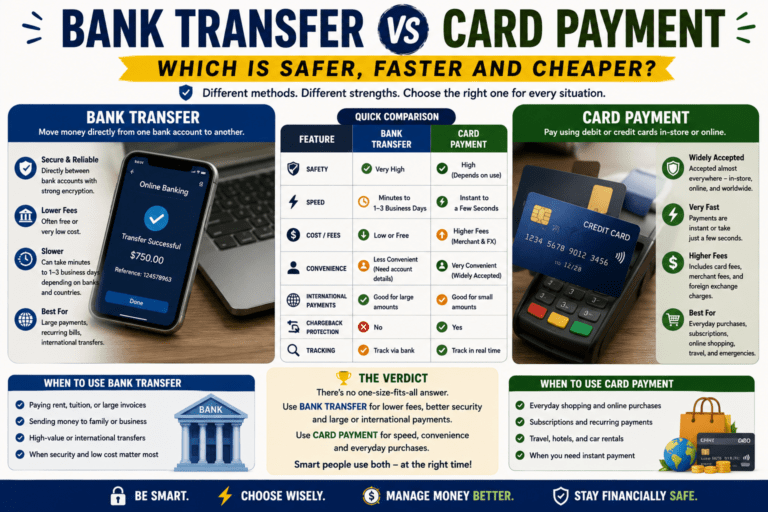
Bank-transfer fraud deserves particular caution because money you intentionally send to a scammer can be difficult to recover.
Therefore, independently verify unusual payment instructions, especially when a large amount is involved.
Ultimately, the goal is not to become afraid of online or mobile banking.
Instead, build simple habits that make scams harder to succeed.
Strong passwords, authentication, account alerts, careful verification and quick reporting can all help protect your bank account from scams while allowing you to continue using modern banking safely.
One Comment